이 자료는 인하대학교 오픈SW개론 정진만 교수님 강의자료 및 수업을 참고하여 작성하였습니다.
Special variables in bash
$0 : 현재 프로세스 이름
$$ : 현재 프로세스 PID; 명령어 식별자 ID
chsh command
로그인하는 예제
$ chsh -s /bin/sh
Shell Environment
HOME=/home/usr
PWD=/home/user/oss
PATH=/bin:/usr/bin
Shell Variable
- 변수 할당 문법
name=value
bash에서 white-space또한 문법 중 하나이기 때문에 name = value와 같이 작성하시면 안됩니다.
$ GREETING="Hello, World"
$ echo $GREETING
Hello, World
- 변수 작명법 문자, 숫자, 언더바(
_) 시작은 문자, 언더바(_)로 해야 합니다. $ myname =jay # 띄어쓰기를 하면 안됩니다. myname: command not found $ myname=jay $ my=11 $ My=12 $ _my=13 $ echo $myname jay
Shell Variable: set
| 명령어 | 설명 |
|---|---|
| set | 모든 쉘 변수들을 보여주는 함수 |
| ### Shell Variable: unset |
| 명령어 | 설명 |
|---|---|
| unset varname | 모든 shell variables을 삭제 |
$ My=12
$ echo $My
12
$ set | grep My
My=12
$ unset My
$ echo $My
$ set | grep My
Environment Variable
- Environment variables 작업이 시작이 되면,
child process에서 작동이 됩니다. - Built-in environment variables 이미 설정되어 있는 변수들이 존재합니다.
PWD,HOME,PATH등이 존재합니다. 모두 대문자로만 구성이 되어있습니다.
Environment Variable: export
환경 변수
| 명령어 | 설명 |
|---|---|
| export varname=value | environment variable를 만드는 명령어입니다. |
| env | environment variable의 이름과 값들을 보여줍니다. |
$ var1=10
$ export var1
$ export var2=20
$ env | grep var
var1=20
var2=20
Environment Variables
Environment Variables은 child process로 상속이 됩니다.
$ pstree | grep bash
    |    |    |    | -gnome-terminal--+-bash-+-grep
$ no1=10
$ export no2=20
$ echo $no1,$no2
10,20
$ bash
# start the child process
$ pstree | grep bash
    |    |    |    | -gnome-terminal--+-bash---bash-+-grep
$ echo $no1,$no2,20
$ exit
# end the child process
exit
$ pstree | grep bash
    |    |    |    | -gnome-terminal--+-bash-+-grep
$ echo $no1,$no2
Environment Variables: export-n
환경변수 권한 삭제
$ export no1=10
$ export no2=20
$ echo $no1,$no2
10,20
$ bash
# start the child process
$ echo $no1,$no2
10, 20
$ exit
# end the child process
exit
$ export -n no2
$ echo $no1,$no2
10,20
$ bash
# start the child process
$ echo $no1,$no2
10,
Example - A Makefile file
Makefile에서 환경 변수 설정할 때, 많이 사용함.
export CROSS=/bin/usr/arm-linux-gnueabi
export CC=${CROSS}-gcc
export OBJDUMP=${CROSS}-objdump
export CFLAGS= -Wall

$CC $CFLAGS hello.c -o hello
$OBJDUMP -d hello
Built-in environment variables
| Environment Variable | Meaning |
|---|---|
| HOME=/home/fos | Home directory |
| PATH=/usr/local/sbin | Path setting |
| PWD=/home/students/common | Current working directory |
| SHELL=/bin/bash | Current login shell name |
| OSTYPE=Linux | OS type |
- 디렉토리 이름들은 (
:)으로 구분을 합니다. - 만약 당신이 디렉토리들을 추가를 하고 싶을 경우,
PATH=$PATH":/home/you/bin"라고 작성하시면 됩니다.
$ echo $PATH
/home/fos
$ ls
text.txt
$ PATH=/dev/
$ ls
ls: command not found
cd는HOME디렉토리를 변경합니다.
$ echo $HOME
/home/fos
$ cd
$ pwd
/home/fos
$ HOME=/home/fos/oss
$ cd
$ pwd
/home/fos/oss
Brace Expansion
,사이에 white-space작성하면 안됩니다.
brace expansion이 적용 안되는 경우:$ echo {1,2} 1 2 $ echo a{AA,BB}b aAAb aBBb $ echo a{1, 2}b # brace expansion이 적용되지 않음 a{1, 2}b
$ echo {5..12}
5 6 7 8 9 10 11 12
$ echo {c..k}
c d e f g h i j k
$ echo {5..k}
{5..k}
- 증감 연산법:
$ echo {1..10..2} # 2씩 증감 1 3 5 7 9 $ echo {a..z..3} # 3씩 증감 a d g j m p s v y $ echo {10..50..5}% 10% 15% 20% 25% 30% 35% 40% 45% 50%
Combination of Brace Expansion
$ echo {1,2}{A,B}
1A 1B 2A 2B
$ echo {2..9}X{1..9}
2X1 2X2 # 대충 구구단
$ touch logfile_{1..5}.{c,h}
$ ls
logfile_1.c logfile_2.c
logfile_3.c logfile_4.c
logfile_5.c logfile_1.h
logfile_2.h logfile_3.h
logfile_4.h logfile_5.h
Nested Brace Expansion
$ echo a{b,c{d,e}}f
abf acdf acef
$ echo {{a..z},{A..Z},{0..9}}
a b c d e f g h i j k l m n o p q r s t u v w x y z A B C D E F G H I J K L M N O P Q R S T U V W X Y Z 0 1 2 3 4 5 6 7 8 9
The more Brace Expansion - Only for bash
sh에서는 지원하지 않는 기능입니다.
$ A=file
$ echo $A{1,2} # 변수 치환이기 때문에 {}를 작성해야 함
# null
$ A=file
$ echo ${A}{1,2}
file1, file2
Tilde Expansion
~:Home directory~+:PWD변수 (현재 디렉토리)~-:OLDPWD변수 (이전 작업 장소)
$ pwd
/home/inha/oss     # 1
$ ls
bin prj
$ cd bin           # 2
$ cd ../prj        # 3
$ echo ~           # HOME
$ echo ~+
/home/inha/oss/bin # PWD
$ echo ~-
/home/inha/oss/bin # OLDPWD
$ cd ~
$ pwd
/home/inha/oss
Substitution
Variable Substitution
| 명령어 | 설명 |
|---|---|
$parameter 또는 ${parameter} | 변수 치환 |
$parameter는 다소 추상적이기 때문에 확실하게 작성하기 위해서는${parameter}라고 작성해야 합니다.$ echo "Your mail INBOX is located in $MAIL" Your mail INBOX is located in /var/mail/fos
$ your_id=${USER}-on-${HOSTNAME}
$ echo $your_id
inha-on-ubuntu
$ OSS=2113
$ echo CSE$OSSCourse
CSE
$ echo CSE${OSS}Course
CSE2113Course
Variable Substitution
| 명령어 | 설명 |
|---|---|
${PARAMETER:-WORD} | unset이나null일 경우, WORD출력하는 명령어 |
${PARAMETER-WORD} | unset의 경우, WORD출력하는 명령어 |
- 간단하게 말하여 위 상황에 일치하면
WORD를 출력하는 문법입니다.
$ OSS=2113           # SET
$ echo ${OSS:-1000}
2113
$ echo ${OSS-1000}
2113

$ unset OSS          # UNSET
$ echo ${OSS:-1000}
1000
$ echo ${OSS-1000}
1000
$ OSS=              # null
$ echo ${OSS:-1000} # unset이랑 null일 경우 실행
1000
$ echo ${OSS-1000}  # unset일 경우만 실행
(null)
Command Substitution
| 명령어 | 설명 |
|---|---|
| $(command-name)또는 command-name | 명령어 치환 |
- 명령어를 실행할 때, 사용하는 방법
$ echo User $(whoami) is on `hostname`
User fos is on ubuntu
Arithmetic Expansion
| 명령어 | 설명 |
|---|---|
| $(( EXPRESSION )) | 수학 수식 |
$ a=10
$ b=20
$ c=a+b
$ echo $a $b $c
10 20 a+b
$ c=$((a+b))
$ echo $a $b $c
10 20 30
$ echo $a $b $c %d
10 20 100 100

$ expr a + $(( b + 3 ))     # 에러가 아닐 때만 print
expr: non-integer argument

$ expr $a + $(( b + 3 ))
33
Filename Expansion
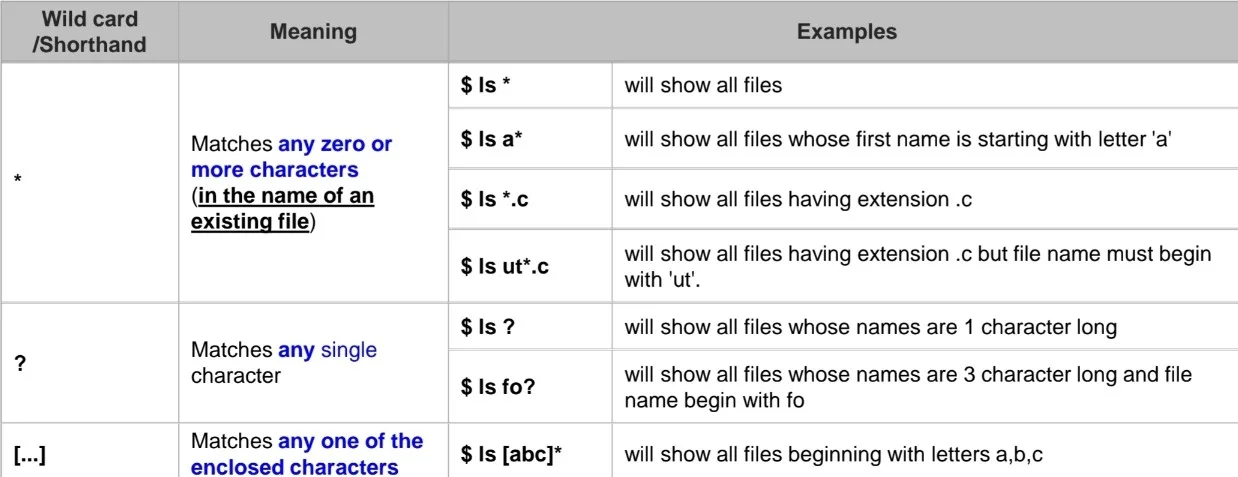
이미지 출처: 작성자 제작/캡처
| Wildcard Matches | Meaning |
|---|---|
| ? | Any single character |
| * | Any string of characters |
| [set] | Any character in set variable |
| [^set] | Any string not containing int set variable |
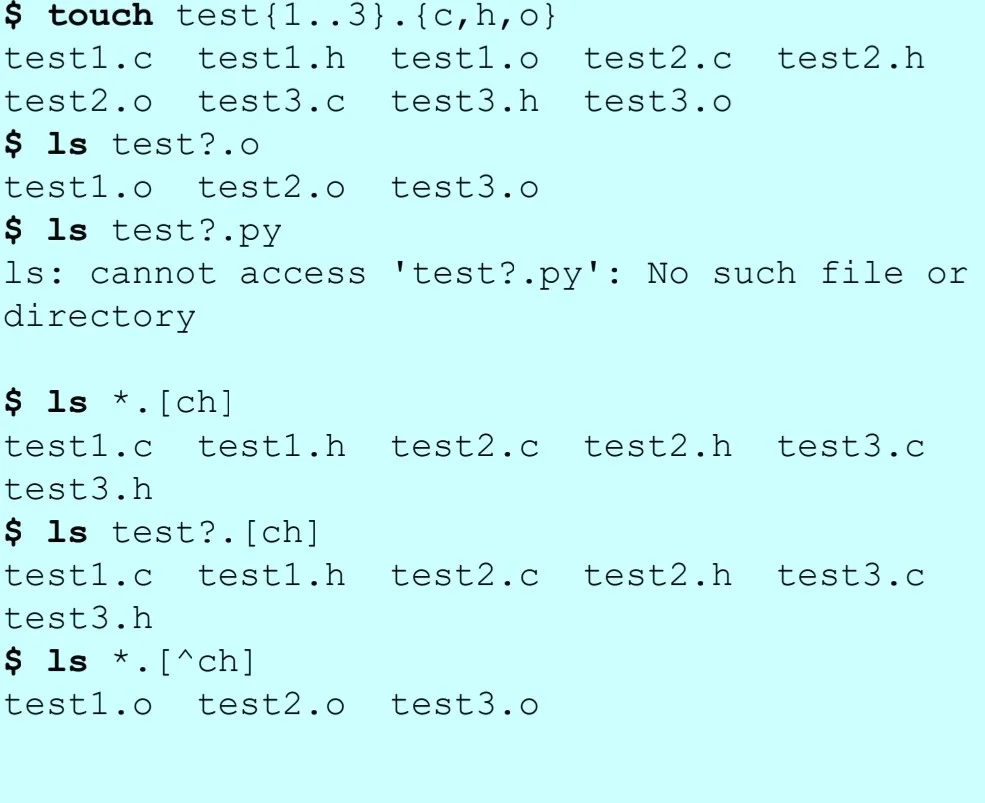
이미지 출처: 작성자 제작/캡처
Metacharacters
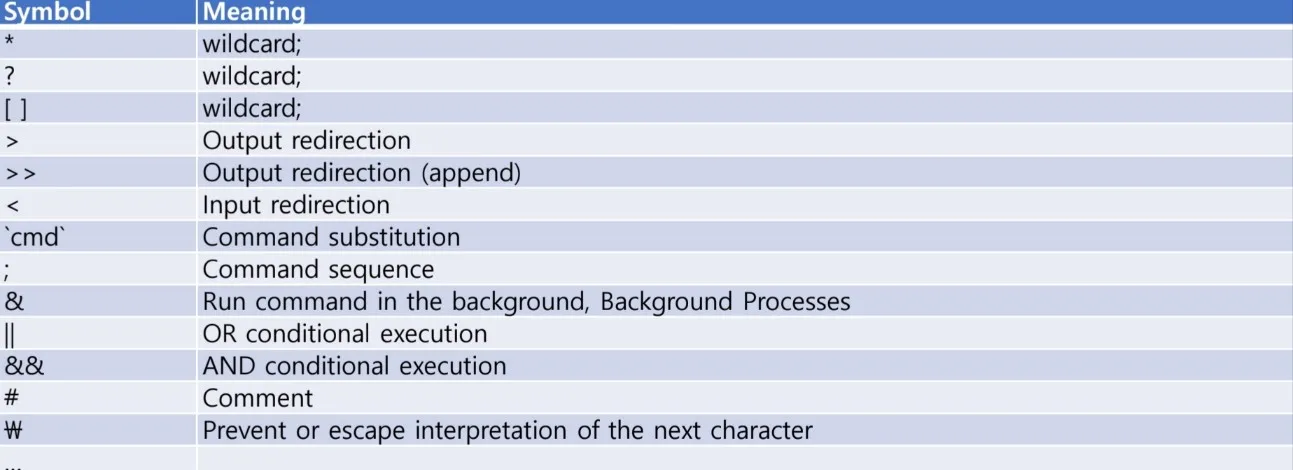
이미지 출처: 작성자 제작/캡처
Quotes
$ a=11
$ b='22'
$ c="33"
$ echo $a $b $c $((a+b+c))
11 22 33 66

$ ls hello world
ls: cannot access 'hello': No such file or directory
ls: cannot access 'world': No such file or directory
$ ls "hello world"
Ls: cannot access 'hello world': No such file or directory

$ ls test*
test1.c test.h
$ ls "test*"
ls: cannot access 'test*': No such file or directory
- 규칙
Quoting은 특별한 기능을 하는 문자들의 기능을 삭제할 때 사용합니다. - 종류
- Escape character
$ touch test{1..3}.py
$ ls
test1.py test2.py test3.py
$ touch *
$ ls
test1.py test2.py  test3.py
$ touch \*
$ ls
* test1.py test2.py test3.py

$ echo $USER
fos
$ echo \$USER
$USER
- Single quote - String quotes
모든 것을 무시합니다.
- Double quote - Weak quote
변수랑 명령어를 제외하고 무시합니다.
$ rm -rf *
$ touch this is a $USER
$ ls
a fos is this

$ touch 'this is $USER'
$ ls
a fos is this this is a $USER

$ touch "this is a $USER"
$ ls
a fos is this this is a inha this is a $USER