양자화 필요성
많은 메모리 요구로 인해 LLM 모델들은 양자화(Quantization)가 필수적이다.
보통 local 컴퓨터에서 Llama는 8b 모델을 Gemma는 7b 모델을 이용한다.
여기서 8b는 80억 개 7b는 70억 개 변수 사용을 의미한다. 때문에 메모리가 부족한 것이고, 양자화가 필요한 이유다.
필자 컴퓨터 사양
| Memory(RAM) | 32GiB |
|---|---|
| GPU | Nvidia 3050 |
양자화 이전
다음은 beomi/gemma-ko-7b 모델을 사용한 예제이다.
hugging face에 들어가서 로그인하고 인증받은 token으로 로그인하면 된다.
https://huggingface.co/beomi/gemma-ko-7b
beomi/gemma-ko-7b · Hugging Face
Hugging face에 로그인하는 코드이다.
from huggingface_hub import notebook_login
notebook_login()
gemma-ko-7b 모델을 load하는 코드이다.
아래 코드를 실행하면 메모리는 다음과 같고 에러가 발생하였다.
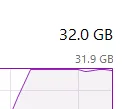
이미지 출처: 작성자 제작/캡처
import torch
from transformers import AutoTokenizer, AutoModelForCausalLM, set_seed, BitsAndBytesConfig

set_seed(1234)

# Identify the checkpoint to use
model_checkpoint = "beomi/gemma-ko-7b"

# Load the tokenizer
tokenizer = AutoTokenizer.from_pretrained(model_checkpoint)

# Load the model with GPU
model = AutoModelForCausalLM.from_pretrained(
    model_checkpoint,
    device_map="cuda"
)
주어진 text에 대한 답변을 추론하는 코드이다.
# Example text for the model to process
text = "파이썬으로 bfs 코드 작성해줘"
inputs = tokenizer(text, return_tensors="pt").to("cuda")

# Generate output
with torch.no_grad():
    outputs = model.generate(inputs["input_ids"], max_length=150)

# Decode the output to text
decoded_output = tokenizer.decode(outputs[0], skip_special_tokens=True)
print(decoded_output)
양자화 이후
위와 같은 문제가 발생하지 않도록 양자화(Quantization)을 적용해보겠다.
Hugging face에 로그인하는 코드이다.
from huggingface_hub import notebook_login
notebook_login()
gemma-ko-7b 모델을 load하는 코드이다.
이번에 필자와 같거나 보다 좋은 컴퓨터 사양이라면 정상 작동할 것이다.
import torch
from transformers import AutoTokenizer, AutoModelForCausalLM, set_seed, BitsAndBytesConfig

set_seed(1234)

# Identify the checkpoint to use
model_checkpoint = "beomi/gemma-ko-7b"

# Load the tokenizer
tokenizer = AutoTokenizer.from_pretrained(model_checkpoint)

# Define the BitsAndBytesConfig for 8-bit quantization
bnb_config = BitsAndBytesConfig(
    load_in_8bit=True,
    bnb_8bit_compute_dtype=torch.float16,
    bnb_8bit_use_double_quant=False
)

# Load the model with 8-bit quantization and move it to GPU
model = AutoModelForCausalLM.from_pretrained(
    model_checkpoint,
    quantization_config=bnb_config,
    device_map="cuda"
)
추가된 코드는 다음과 같고 8bit로 양자화하여 load한다.
구체적으로 BitsAndBytesConfig parameter에 대해 궁금하다면, 다음 hugging face transformer docs를 참고하면 된다.
# Define the BitsAndBytesConfig for 8-bit quantization
bnb_config = BitsAndBytesConfig(
    load_in_8bit=True,
    bnb_8bit_compute_dtype=torch.float16,
    bnb_8bit_use_double_quant=False
)
주요 설정은 다음과 같이 이해하면 된다.
| 설정 | 의미 |
|---|---|
load_in_8bit=True | 모델 weight를 8-bit로 로드한다. |
bnb_8bit_compute_dtype=torch.float16 | 연산 시 사용할 dtype을 float16으로 설정한다. |
bnb_8bit_use_double_quant=False | 추가적인 double quantization은 사용하지 않는다. |
이 설정을 AutoModelForCausalLM.from_pretrained()에 전달하면 모델이 8-bit 양자화된 상태로 로드된다.
model = AutoModelForCausalLM.from_pretrained(
    model_checkpoint,
    quantization_config=bnb_config,
    device_map="cuda"
)
양자화 이후에도 추론 코드는 거의 동일하다.
text = "파이썬으로 bfs 코드 작성해줘"
inputs = tokenizer(text, return_tensors="pt").to("cuda")

with torch.no_grad():
    outputs = model.generate(
        inputs["input_ids"],
        max_length=150,
        do_sample=True,
        temperature=0.7
    )

decoded_output = tokenizer.decode(outputs[0], skip_special_tokens=True)
print(decoded_output)
양자화를 적용하면 모델이 차지하는 메모리가 줄어들기 때문에, 같은 GPU에서도 더 큰 모델을 로드하거나 더 긴 입력을 처리할 수 있다. 다만 weight precision을 낮추는 방식이므로 모델의 출력 품질이 원본과 완전히 같지는 않을 수 있다.
Llama 모델에서도 동일하게 적용하기
Llama 계열 모델도 같은 방식으로 사용할 수 있다.
모델 이름만 바꾸고, 동일한 BitsAndBytesConfig를 전달하면 된다.
model_checkpoint = "meta-llama/Meta-Llama-3-8B"

tokenizer = AutoTokenizer.from_pretrained(model_checkpoint)

bnb_config = BitsAndBytesConfig(
    load_in_8bit=True,
    bnb_8bit_compute_dtype=torch.float16,
    bnb_8bit_use_double_quant=False
)

model = AutoModelForCausalLM.from_pretrained(
    model_checkpoint,
    quantization_config=bnb_config,
    device_map="cuda"
)
단, Llama 모델은 Hugging Face에서 사용 권한 승인이 필요한 경우가 있다.
모델 페이지에서 접근 권한을 받은 뒤 token으로 로그인해야 정상적으로 다운로드할 수 있다.
정리
LLM은 parameter 수가 많기 때문에 로컬 환경에서 그대로 실행하기 어렵다. 특히 7B, 8B 모델도 GPU memory가 부족하면 로드 단계에서 실패할 수 있다.
양자화는 모델 weight를 더 작은 bit-width로 표현하여 메모리 사용량을 줄이는 방법이다.
이 글에서는 BitsAndBytesConfig를 이용해 8-bit quantization을 적용하였다.
- 양자화 전에는 모델 로드 단계에서 memory 부족이 발생할 수 있다.
load_in_8bit=True를 사용하면 8-bit weight로 모델을 로드할 수 있다.- 메모리 사용량은 줄어들지만 출력 품질이나 속도는 환경에 따라 달라질 수 있다.
- 로컬 환경에서 LLM을 실험할 때는 quantization이 거의 필수적인 선택지다.